
A review QR code works where somebody is finished, pleased and holding a phone. That means receipts, the back of a card handed over at the end, the invoice, the counter at the point of payment, and the van or the paperwork a tradesperson leaves behind. It does not work on a window, a billboard, a vehicle in motion, or anywhere the person has not yet been served. Google itself suggests asking customers to visit a link or scan a QR code, so the mechanism is fine. The placement is what decides whether it is used.
Deciding where to put a review QR code takes two minutes and is usually skipped. Most are printed once, stuck somewhere convenient for the business, and scanned by nobody.
The three conditions
The service is finished
Before that, the customer has nothing to say.
The phone is already out
Paying, checking a message, waiting for a receipt.
Somebody has mentioned it
A code with no ask is wallpaper. The code is the convenience, not the request.
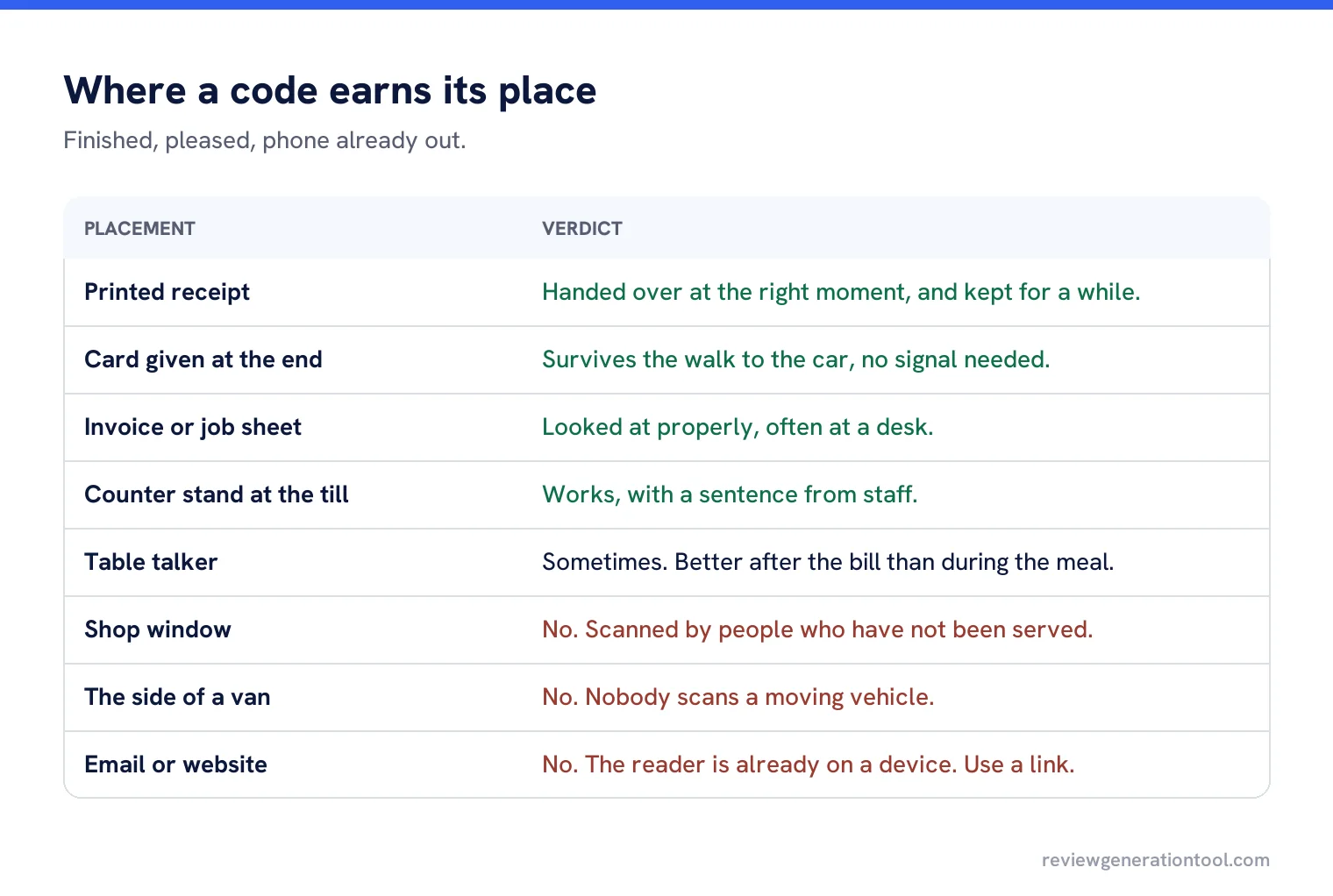
Where to put it
| Placement | Works? | Why |
|---|---|---|
| Printed receipt | Yes | Handed over at exactly the right moment, and kept for a while. |
| Card given at the end | Yes | Survives the walk to the car, no signal needed to carry it. |
| Invoice or job sheet | Yes | Looked at properly, often at a desk. |
| Counter stand at the till | Yes, with a sentence from staff | Right moment, right place. |
| Table talker in a restaurant | Sometimes | Better after the bill than during the meal. |
| Shop window | No | Scanned by people who have not been served. |
| The side of a van | No | Nobody scans a moving vehicle, and passers-by are not customers. |
| Email signature | No | The reader is already on a device. Use a link. |
| Website | No | Same reason. A link is one tap, a code is a second device. |
Designing the code itself
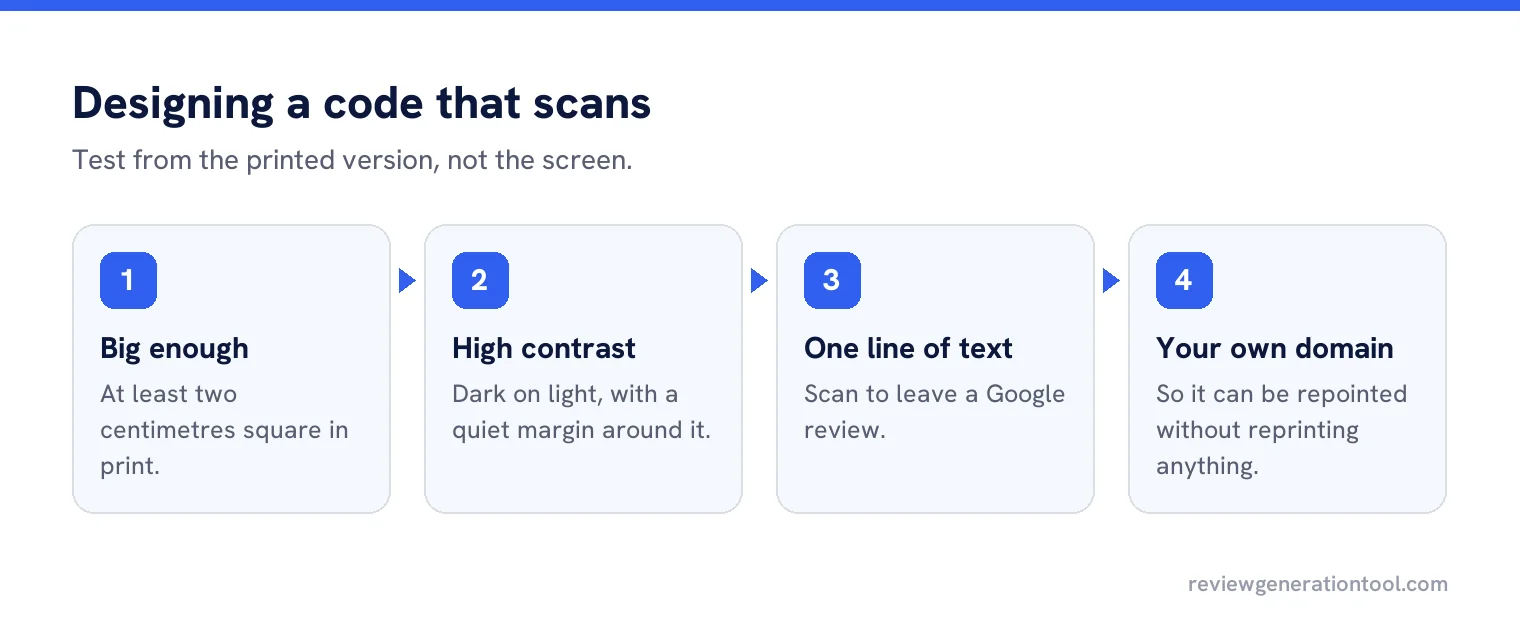
- Big enough to scan from a comfortable distance, which usually means at least two centimetres square on print.
- High contrast, dark on light, with a quiet margin around it.
- One line of text underneath saying what it does: “Scan to leave a Google review”.
- Pointing at a link on your own domain, so it can be repointed without reprinting.
- Tested on both common phone platforms, from the printed version rather than the screen.
The redirect that saves you later
Never encode the Google review URL directly. Encode a short link on your own domain that redirects to it. When Google changes the shape of its links, or you want to point the code somewhere else for a month, you update a redirect instead of reprinting ten thousand receipts.
That one decision is the difference between a code that lasts five years and one that quietly stops working.
What the code should not do
It should go straight to the review box. Not to a landing page offering three platforms, not to a form asking how you did, and certainly not to a page that routes happy customers to Google and unhappy ones to a private form. That last pattern is gating, and it is a rule breach rather than a clever funnel.
A worked example
A coffee shop printed the code on the bottom of every receipt with the line “Scan to leave us a Google review”. Staff mention it when handing over the receipt, which takes two seconds.
They also tried a window sticker and a table talker. The window produced nothing measurable. The table talker produced a handful, mostly from people reading it while waiting, who then wrote reviews about waiting. The receipt was the only placement that consistently produced reviews about the coffee.
Printing it alongside something people keep
The best placements share one quality: the paper survives the moment. A receipt goes in a pocket, an invoice goes in a drawer, a service card goes in the glovebox. Each of those gives the customer a second chance to scan at a calmer moment, often that evening.
Printed materials that get thrown away immediately, such as a leaflet handed over at the door, convert far worse even when the code is identical. If you can put the code on something the customer was going to keep anyway, do that before printing anything new.
Codes on screens
A tablet at the counter showing a code, or a code on a card machine receipt screen, works well in businesses where there is a natural pause at payment. Two practical cautions: screens reflect, so test under the lights you actually have, and anything on a shared screen needs to be the right location’s code in a multi-site business, which is easy to get wrong when the same device is moved between branches.
Multi-location businesses
Each location needs its own code pointing at its own profile. The usual failure is one code for the brand, printed centrally, sending everyone to the flagship branch. Generate codes from the same record that holds the store codes, print them per site, and check a sample from each batch before distribution.
Measuring whether it works
Because the code points at your own domain first, you can count scans. Compare scans with reviews received, and compare both against locations or materials. If a placement produces scans but no reviews, the problem is after the scan, usually customers not being signed into a Google account.
When a code is the wrong tool
If you already have the customer’s phone number or email, send a link instead. A code asks somebody to pick up a device, open a camera and aim it; a link is one tap. The code earns its place when you are face to face and have no contact details, or when the paperwork will outlive the conversation. Businesses that send a text and also hand over a card are not doubling their chances, they are asking twice.
Refreshing it
Check the printed codes once a year by scanning one from each batch in circulation. Reprints happen, templates get copied, and the single most common fault is a batch of new receipts carrying the code from a branch that closed.
A code per location, pointing where you choose
Generate review QR codes for every profile, built on links you control and can repoint at any time.
Frequently asked questions
Where should a review QR code go?
On receipts, cards handed over at the end, invoices and counter stands at the point of payment. Anywhere the service is finished and the phone is already out.
Why do window and vehicle QR codes fail?
Because the people seeing them have not been served. A review request only makes sense to somebody who has just experienced the service.
Should the code link straight to Google?
Encode a short link on your own domain that redirects to the review box. Then you can repoint it without reprinting anything.
Can the code go to a page that asks how we did first?
No. Routing happy customers to Google and unhappy ones to a private form is gating, which breaks the rules rather than being a clever funnel.
How do I know if the code is working?
Because it points at your own domain, you can count scans and compare them with reviews received, per location and per printed material.
Sources
The Google documentation behind the guidance on this page. Google changes these pages without notice, so check the date on any figure before you rely on it.